Most teams pick one of two regression strategies, and both fail the same way.
The first is to run the whole suite on every pull request. That works until the suite passes a few hundred tests, at which point the wait outlasts the reviewer's patience and people start approving on a yellow check.
The second is to run nothing until the nightly job. Feedback then arrives twelve hours after the author moved on, and it lands in a dashboard that belongs to nobody in particular.
There is a third approach, and it has two halves. Let the change decide which tests run. Let the failure decide where it lands.
Three tiers, not one suite
A regression suite is not a single job. It is three jobs with different budgets, answering different questions.
| Tier | Trigger | Scope | Question it answers |
|---|---|---|---|
| Per change | Pull request opened or updated | Tests that cover the changed files | Did this change break something it touches? |
| Nightly | Schedule | Everything | Did anything drift while we weren't looking? |
| Post-deploy | Deploy event | A handful of smoke journeys | Is the build that just shipped actually alive? |
The per-change tier is the one most teams skip, because selecting the right subset by hand is tedious and wrong within a week. The nightly tier is covered in the nightly regression playbook. This post is mostly about the first tier and about what happens after something goes red.
Teach the suite what covers what
Targeted selection needs a map from source files to the tests that exercise them. TestVibe builds that map in two ways, and they combine.
The first is the App Code scan. Point a project at its source repository and the scan reads the code, infers the application's functional areas, and lays them beside the tests you already have. The view ranks what is untested ahead of what is covered, so gaps surface first instead of being buried under a reassuring percentage. Mappings the AI proposes can be corrected by hand, and your corrections are sticky: a later re-scan will not overwrite them.
The second is a tag you write in the feature file itself. A @covers: tag names a class or qualified coverage target. Use an unambiguous target from the coverage view:
@covers:CheckoutService
Feature: Checkout

  Scenario: A customer completes checkout with a saved card
    Given I am signed in as a returning customer
    When I check out with my saved card
    Then I see the order confirmation
The tag applies to the whole feature, so put it at the top of the file rather than on one scenario.
One caution worth knowing before you tag a large repo. A bare tag like @covers:Helper is ambiguous when twenty projects each contain a Helper file. An ambiguous tag deliberately resolves to none of them rather than silently marking all twenty as tested, which is the right call: inflated coverage is worse than no coverage, because it hides real gaps behind a reassuring number. The Application coverage view surfaces every ambiguous tag with the candidate files it collided with, so treat that list as a to-do rather than a warning to dismiss.
There is more on the mapping model in mapping tests to app areas.
Run only what the change touches
Once the map exists, a changed file resolves to the tests that cover it. From a pull-request job, that is one command:
testvibe verify --git origin/main --waitThe CLI collects the changed files, resolves each one to the features that cover it, and dispatches exactly those. The same operation is available as a REST call for pipelines that would rather post JSON, and as an MCP tool named verify_change for coding agents that want to check their own work straight after an edit.
Three flags carry the weight, and getting them wrong is the difference between a gate and a decoration.
--git with no argument diffs uncommitted tracked changes against HEAD, which is what you want at a developer's keyboard. In CI the change is already committed, so pass the base branch (--git origin/main) to diff against it. Note that untracked files are not collected either way, so a brand-new file should be passed explicitly with --files or added to Git before it counts as a change.
--wait is what makes this a gate. Without it the command dispatches the runs and returns immediately, and your pipeline goes green while the tests are still executing. With it, the CLI polls the dispatched runs, prints a per-feature verdict table, and exits non-zero for failed or unresolved awaited runs. A no-mapping or zero-dispatch result can return normally: inspect the JSON verified flag and dispatched count and fail the CI job explicitly when coverage is required.
--all is the escape hatch that runs every generated test regardless of mapping, for when you want the full suite on demand.
Two behaviors matter as much as the flags.
It stands down when it doesn't know. If a project has no coverage scan, or the changed files map to nothing at all, the command does not quietly fall back to running everything and does not pretend the change is verified. It reports that coverage is unavailable, hands back the list of files it could not map, and runs nothing. Reaching for --all is a decision you make on purpose.
Unmapped files are reported, not hidden. Any file that resolves to no test comes back in the response. That list is the most honest backlog you will get: it is the set of code your team changed and your regression suite has no opinion about.
Wire it into a pull-request job and the result is a gate that scales. Touch the checkout service and the checkout journeys run. A file without a mapping can dispatch no tests; this is a gap, not proof the change is safe. The full pipeline pattern, including how to block a merge on the result, is in wiring TestVibe into your CI pipeline.
Send the failure where the work happens
A red run that exists only in a test dashboard is a red run nobody owns. The fix is to make the suite reach into the tools your team already has open.
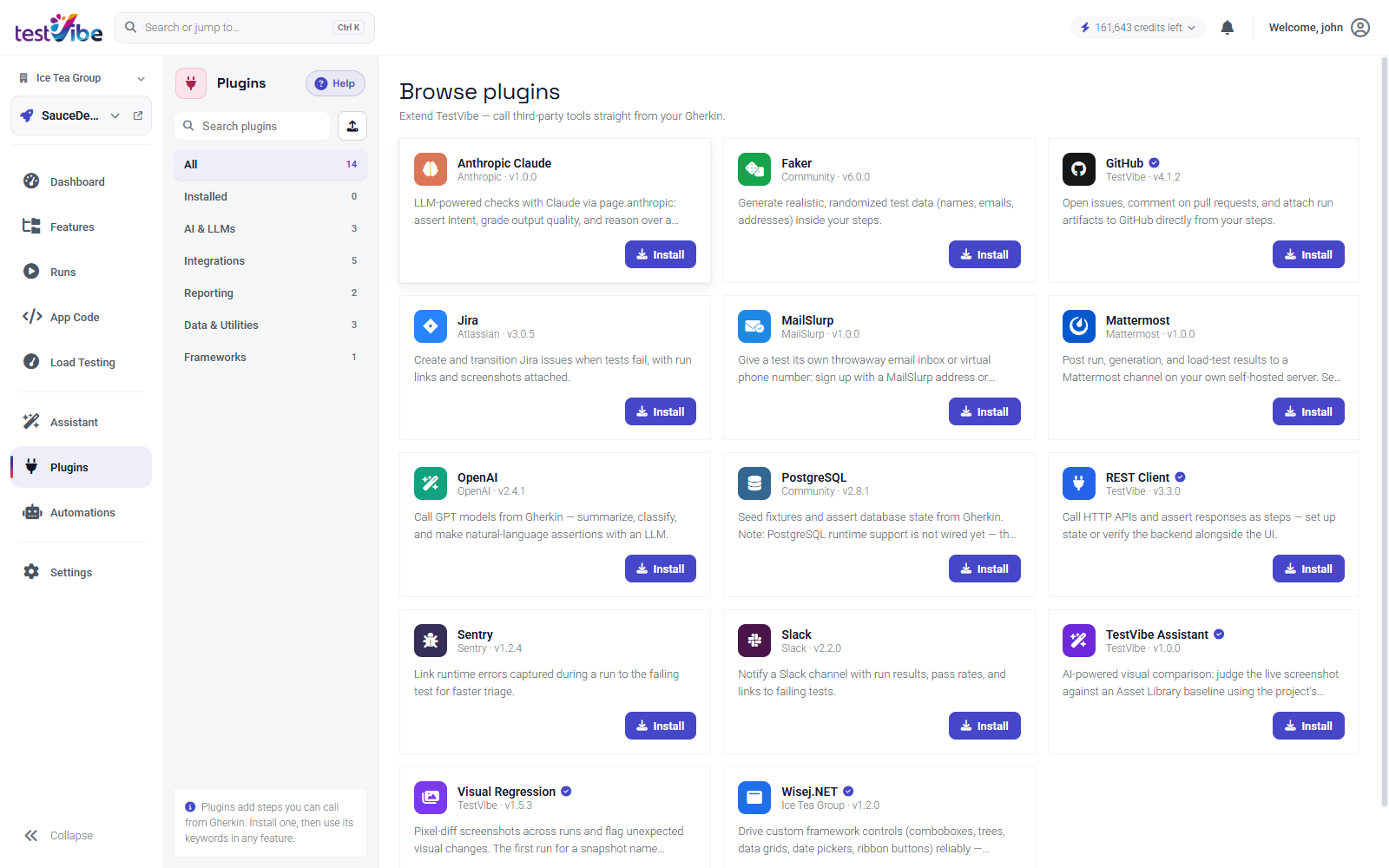
Plugins let a test call outside the browser tab. Enable one per project, set its secret, and the generated Playwright code can use it.
GitHub. With a GITHUB_TOKEN secret in place, tests can open an issue or comment on an existing one through page.github.createIssue({ owner, repo, title, body, labels }) and page.github.appendToIssue(...). The useful pattern is a comment on the pull request that triggered the run, carrying the failing scenario name and a link to the evidence, so the reviewer reads the result in the same tab where they are already reviewing.
Jira. With a JIRA_API_TOKEN secret and the JIRA_BASE_URL and JIRA_EMAIL variables, a failure can create a ticket through page.jira.createIssue({ projectKey, issueType, summary, description, labels }), add context with page.jira.appendPlainComment(...), and move an existing one along with page.jira.transitionIssue(...).
Two practical notes on the Jira side, both learned the hard way by everyone who has automated ticket creation.
Search before you create. page.jira.searchIssues({ jql }) lets a test look for an existing open ticket for the same failure and comment on it instead of opening a duplicate. A flaky test that files a fresh ticket every night will bury your board inside a week, and the team's response will be to ignore the label rather than fix the test.
Look up transition IDs rather than guessing them. Workflow transition IDs are specific to your Jira project's workflow, so page.jira.listTransitions({ issueKey }) tells you what is actually available before transitionIssue tries to use one. Hardcoding an ID you read in someone's blog post is how this breaks on the day someone edits the workflow.
In the feature file, all of this stays in plain language. You describe the outcome you want and generation writes the call:
Scenario: A failed checkout is raised with the team
  Given the checkout regression suite has run
  When the saved-card scenario fails
  Then a Jira issue is created in project QA with the failing scenario name
  And the run link is added as a comment
Chat. Current Personal notification settings manage email, with explicit All / Failures / Off outcome filters. Use supported project plugins or automation actions for team chat delivery and configure them separately.
Errors. Correlate application errors with scenario timestamps and identities where the instrumentation provides them; do not assume every error is automatically attributed to a test.
Keep the tests next to the code
The tier model works better when the tests live where the change lives. With two-way Git sync, your feature files stay in step with GitHub, GitLab, or Azure DevOps, and edits flow in both directions. A reviewer sees the behavior change and the test change in the same diff, which is the moment when "this needs a test" is cheapest to say. The setup is walked through in two-way Git sync.
Let production write your regressions
The best regression tests are not invented. They are the bugs you already shipped.
When a real error surfaces, the fastest path to a permanent guard is to turn that specific failure into a scenario, generate it once, and let it join the nightly tier forever. That loop is covered in turning production errors into regression tests.
What to wire first
If you are starting from nothing, this order gets value soonest and avoids the two most common failure modes, which are a suite too slow to gate anything and a channel too noisy to read.
- Connect the source repository and run one App Code scan. Without the map, targeted selection has nothing to select from.
- Add
@covers:tags to your ten most important features. Then open Application coverage and clear any that come back ambiguous. Ten features that resolve to one file each beat two hundred that resolve to nothing. - Add
testvibe verify --git origin/main --waitto the pull-request job. The--waitis the part that gates. Treat a no-mapping result as a coverage gap, select the relevant tests explicitly, or deliberately run--all. Zero dispatched tests is not verification. - Turn the unmapped-files list into a backlog. Prioritize that gap list using risk and changed behavior.
- Schedule the nightly full suite, with notifications set to failures only.
- Wire one tracker integration, not three. GitHub comments if you review in pull requests, Jira issues if your team plans there. Add the second one after the first has survived a month.
The end state is a suite that says something specific at the moment a change is made, stays quiet when nothing is wrong, and puts the red result in front of the person who caused it while they still remember why.
Want to try this on your own app? Request early access.