CircleCI’s July 2, 2026 incident report describes pipeline-start and UI failures caused by elevated load on an internal data service. A provider incident can resemble an application regression from the outside; the cause needs evidence.
When that happens, your Slack fills with the same message from three different directions: is the site down? And the honest answer, in the first minute, is almost always I don't know. The outage itself you can handle. What burns the first hour is not knowing whether the outage is even yours to fix.
The question you actually need answered
"Is the internet having a day" and "we shipped a bug" produce identical symptoms from where you sit: error-rate spikes, support tickets, a graph trending the wrong way. But they demand opposite responses. If the internet is the problem, you communicate, wait, and maybe fail over, because rolling back your own perfectly good deploy only makes things worse. If you are the problem, every minute you spend blaming Cloudflare is a minute your checkout stays broken for real customers.
So "is something wrong?" is the question you can already answer. Something is. The one worth spending your first minutes on is much narrower:
Right now, is one of my critical flows actually broken for the people using it, when I check from outside my own infrastructure?
Answer that in minutes and the outage becomes a manageable incident. Fail to answer it and you spend an hour in a war room arguing about a dependency you don't control.
Two signals, and why you need both
Two useful instruments provide complementary evidence; neither identifies the cause alone.
Synthetic runs drive your real flows from outside your own network: a browser that loads your homepage, logs in, adds to cart, and checks out, on a schedule, from infrastructure that isn't yours. When a synthetic run of checkout goes red you don't have a graph to interpret, you have a specific, reproducible statement: the purchase path failed, here's the step, here's the screenshot and the trace. It can't tell you why revenue dipped, but it can tell you, whether the checked flow worked under that run’s target, identity and environment.
Production telemetry watches the servers actually running your app under real traffic: CPU, memory, active sessions, and the unhandled exceptions your app is throwing right now, not a synthetic replay. This is the ground truth of impact, real requests on real infrastructure under real load. It is also noisy and correlational. A memory climb or an error spike could be your bug, a dependency behaving badly, or a traffic pattern nobody load-tested.
Compare them as leads for investigation:
| Synthetic (your flow, outside) | Telemetry (your servers, real traffic) | Verdict |
|---|---|---|
| Green | Error spike | Check untested paths, users, regions and dependencies. |
| Red | Error spike | Correlate the failing step with logs, recent changes and dependency status. |
| Red | Quiet | Check the test environment, identity, network and unobserved app failures. |
| Green | Quiet | No issue observed by these checks; investigate reports outside their coverage. |
That two-by-two starts an investigation; it does not establish ownership or justify a rollback by itself. Everything below is just how to wire it so the answer is waiting for you when the pager goes off, instead of something you scramble to assemble at 2am.
Wire it before you need it
The failure mode here is trying to build the instrument during the fire. You can't stand up synthetic monitoring while checkout is down and expect a calm read. The whole point is that it's already running.
Turn your critical flows into scheduled synthetic runs. Take the three or four journeys that, if broken, mean you're losing money or trust (sign-in, checkout, the core create action) and run them on a schedule against production. Not the whole suite; the load-bearing few. In TestVibe these are just automations: pick the features, set a cadence (every 15 minutes for the ones that matter most), and each firing is a real browser executing the real flow against your real URL. When one goes red, you get the failing step plus the artifacts: the screenshot at the moment of failure, the video, a Playwright trace when capture and retention permit. "Checkout is broken" now arrives as evidence instead of a hunch.
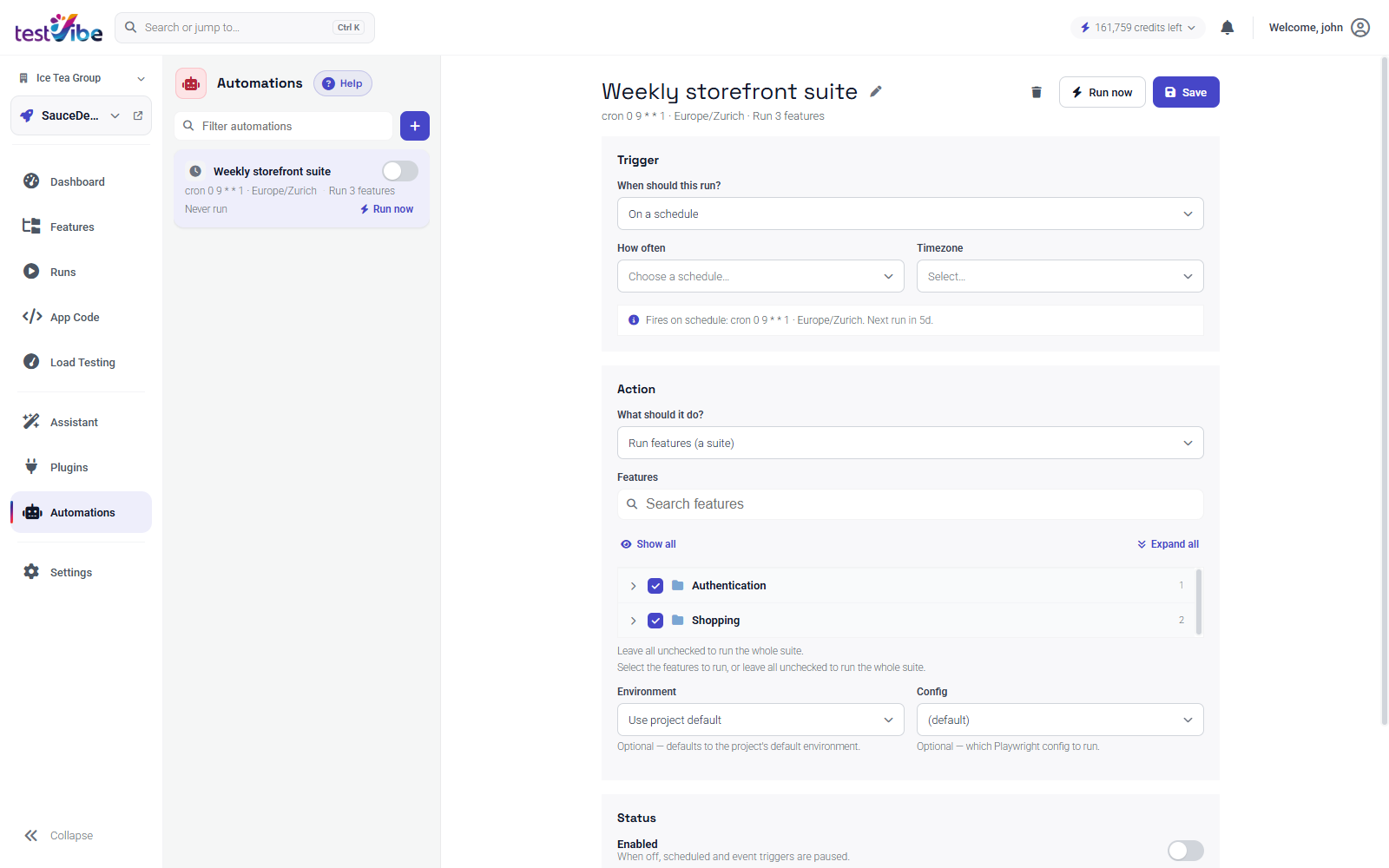
Keep production telemetry on the same pane. Place the runner outside your infrastructure if you need an external vantage point. Synthetic runs check the selected flow; telemetry adds evidence about the instrumented app. Streaming CPU, memory, active sessions, and exception history straight from the running app means that when a synthetic run stays green but the graph looks ugly, you can see whether your servers are erroring under load, and if they are, whether your own code or a dependency shows up in the stack trace.
That combination is what separates monitoring your servers from monitoring your product. Your servers can sit at a comfortable green while checkout is quietly broken for every single person trying to pay you, and a wall of healthy infrastructure metrics will cheerfully report that nothing is wrong.
The triage flow, concretely
Here's the runbook. The pager fires, or someone asks "is the site down?" Instead of guessing:
- Look at the last synthetic run of your critical flows. Not the infra dashboard — the run that drives checkout end to end. A recent green run records success at that time under that configuration; re-check if the situation changed. A red run is a failure to investigate, with whatever artifacts were retained.
- Cross-check telemetry for real impact. Is your production app throwing errors right now, and if so, is your code in the stack or a dependency? A spike confined to one third-party call is a different incident than an unhandled exception spreading across the app.
- Use the two-by-two to choose the next check. Compare timestamps, target, runner location and identity; inspect dependencies and recent changes before deciding on remediation.
- When it's you, go straight to the artifacts. A failed synthetic run hands you a scenario rather than a number: re-run and triage it with the trace open, stepping through the exact DOM state at the moment it broke. You're debugging a real signal instead of reconstructing one from log fragments.
These signals can narrow the investigation. They do not settle fault on their own; use the failing step and correlated logs to test your hypothesis.
The backbone, the CI provider, the CDN: all of it will keep having bad days on a schedule you don't set. What you actually control is how many minutes pass before you know whether their bad day has become yours. Wire both signals up now, while everything's green, and the next time the substrate shakes you'll be reading one red-or-green run instead of assembling a war room from scratch.
Want scheduled synthetic runs of your critical flows, with production telemetry on the same screen? Get early access, or read how automations turn a feature into a monitor.