TestVibe generates Playwright tests from behavior you describe in plain language — most flows never need a plugin, since you describe the click, the assertion, and the navigation, and the AI writes it. Plugins are for the parts that reach outside the browser tab: an email inbox, an LLM judgment, a Jira ticket, a database row. Here's what ships in the built-in catalog, how to enable one per project, and when reaching for one beats the workaround you'd otherwise write.
What a plugin actually adds
A plugin adds steps you can call from Gherkin. Install one, and its capability becomes available to every feature in the project — you describe the intent in a scenario, and generation wires it into the test. Nothing about your normal authoring changes; you're just handing the generator a tool it didn't have before.
Take email verification. Without a plugin, a signup-with-confirmation flow is awkward to test: you can't read the message the app just sent, so you end up mocking the mail service, disabling verification in a test config, or hard-coding a code that drifts out of sync with reality. With configured TestVibe Mailbox support, the flow reads like the real thing:
Scenario: New user confirms their email before first login
  Given a fresh test inbox
  When I register a new account with that inbox address
  Then a verification email arrives within 30 seconds
  And opening the confirmation link activates the account
The scenario describes behavior; configured Mailbox support supplies an inbox for the email flow. That's the whole model — behavior in the feature file, capability from the plugin.
The catalog
The visible catalog depends on global and account-private rows and your installation. Platform-owned identity and mailbox helpers are not customer-installable catalog entries. The Plugins section in the navigation rail is a searchable marketplace with category filters (AI & LLMs, Integrations, Reporting, Data & Utilities, and Frameworks) and an Installed shortcut.
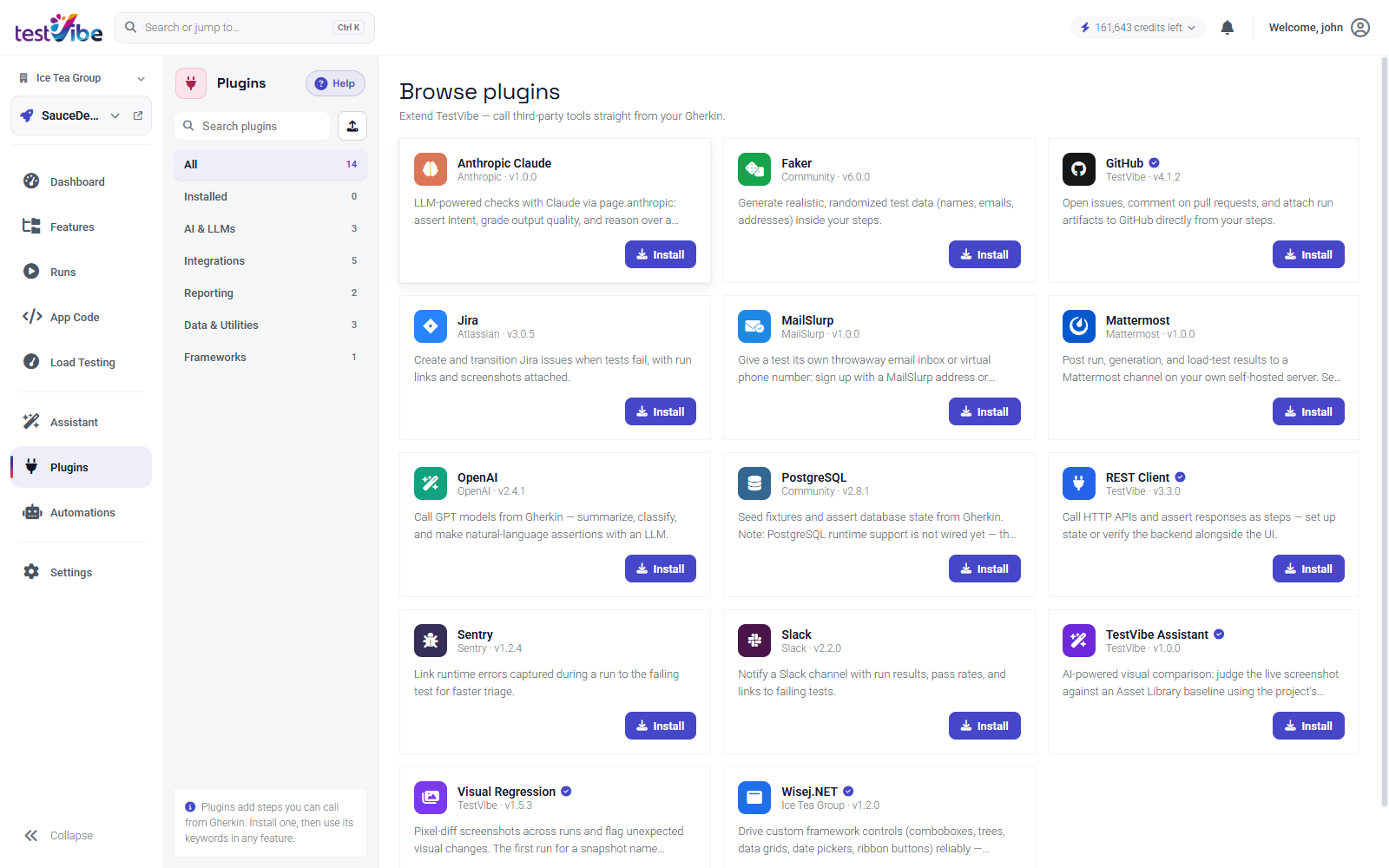
Examples include shipped provider implementations for OpenAI, Anthropic, GitHub, Jira, Visual Regression, Wisej.NET and SQL Server. Inspect each current detail page, requirements and enabled capabilities rather than treating a fixed table as the full catalog.
You can also publish your own packaged steps from the upload action in the rail, to share an internal helper with your team.
Enabling a plugin per project
Installs are scoped to a project, not to your account, and they persist. Turn one on and it stays on across reloads, and every teammate on that project sees it installed until someone removes it.
- Select Plugins from the navigation rail.
- Search or pick a category to find the plugin.
- Select Install on its card. Installed plugins show an Installed badge; select the badge to update or remove.
If a card ever looks out of sync right after you toggle it, use the catalog's Retry option to refresh from the server rather than assuming the install didn't save — the toggle persists server-side even when the card hasn't caught up.
Configuring what a plugin needs
Plugins that talk to a third party need credentials — a Slack webhook, a Jira token, a Faker call needs nothing. Where a plugin does need values, its detail modal shows a Requires section: each requirement carries a Set or Not set badge, and the header counts how many are still missing.
You can fill a value inline in that field, or set it on the dedicated Settings → Variables & Secrets panel. Either way it lands in the project's variables and secrets, where secret values are write-only — saved once, never displayed back. Reference them from steps the same way you reference any stored value:
When I open a Jira issue in project "{{var:JIRA_PROJECT_KEY}}" using token "{{secret:JIRA_API_TOKEN}}"Use a runtime reference so the value is not written into the feature file. Secrets are injected into generation and run environments as needed, and known values are redacted from transcripts; review browser evidence before sharing it. If a plugin step fails with a missing-value error, the entry name in Variables & Secrets not matching the token exactly is one possible cause.
When a plugin beats a workaround
The honest test for reaching toward a plugin: would the alternative make the test lie about what your users experience?
- Email verification. Mocking the mail provider or disabling verification in a test build proves your app works with verification turned off — which is not the thing you shipped. Configured Mailbox support reads email messages; current Mailbox SMS delivery is unavailable. This can exercise the real email gate when correctly configured.
- Fuzzy output. An exact-string assertion on AI-generated copy, a localized date, or a summarized paragraph fails on noise that a human would call correct. An OpenAI or Claude check can assess intent — "the summary mentions the refund policy" — and survives wording that doesn't matter.
- Unique test data. Hard-coded emails and usernames collide on unique constraints the second time a suite runs. Randomized test data can reduce collisions, but enforce uniqueness when the workflow requires it.
- Visual drift. Eyeballing screenshots doesn't scale and doesn't gate a pipeline. Visual Regression pixel-diffs against a baseline in your Asset Library and can create a missing baseline and save mismatch evidence; inspect configured tolerance and comparison results.
- Failure routing. A failing run buried in a dashboard gets seen when someone looks. Slack, Jira, and GitHub plugins push the result — with links and screenshots — to where the team already works.
When the workaround is cheap and honest, skip the plugin. When it forces the test to stub out the very behavior you care about, install the plugin and describe the real flow.
Install only what a project uses — every installed plugin's keywords surface in authoring suggestions, so a lean set keeps generation focused. For the full catalog and per-plugin setup, see the Plugins docs. Ready to generate tests that reach past the browser tab? Get early access.