A suite of ten tests organizes itself. A suite of two hundred does not: the difference between a suite you trust and one you avoid is usually whether you can find the right test, tell at a glance what it covers, and change it without dread. TestVibe gives you two primitives for that job: features (atomic behaviors) and groups (structure around them).
Features are atomic behaviors
In TestVibe a feature is a .feature file that describes one behavior in Gherkin, and a scenario is a single concrete example of that behavior. The whole model works best when a feature stays small: one login path, one filter, one checkout variation. The Gherkin reference puts it directly: if a scenario starts covering several unrelated behaviors, split it.
That advice scales up to whole features. A feature named "User signs in with valid credentials" tells a teammate exactly what it proves. A feature named "Login flow" that signs in, updates a profile, resets a password, and downloads an invoice tells them nothing until they open it, and when it fails on step three, the failure is buried under everything that ran before it.
Atomic features give you three things a monster flow can't:
- Precise failure signal. When "Add item to cart" is red and "Checkout happy path" is green, you have a narrower failure to investigate.
- Independent runs. You can run the one behavior you're investigating instead of a fifteen-minute journey.
- Cheaper maintenance. Change how sorting works and you regenerate one small feature, not a sprawling flow that also happens to touch sorting.
Each feature still begins at the site's landing entrypoint and navigates forward with explicit steps. Atomic doesn't mean skipping how the app was reached; it means each feature reaches its screen and proves one thing.
Groups are the structure
A group is a folder-like area for related features, and it maps to a folder in your project: a group called Auth lives at Features/Auth/. Feature files sit under Features/, grouped by area:
Features/
  Auth/
    Login.feature
    Login.spec.js
  Billing/
    DownloadInvoice.feature
    DownloadInvoice.spec.js
  Shopping/
    AddItemToCart.feature
    CheckoutHappyPath.feature
A good group is a product area, workflow, or feature family (Auth, Billing, Admin), something meaningful to the team, not just a technical folder. Group by the part of the product a teammate would name when they say "the billing tests are flaky," not by test type or by which sprint added them.
Groups aren't only organizational. Select one and you get a group overview: how many features it holds, how many passed on their last run, how many scenarios live across the group, and recent generation and run activity. From there you can add a feature, import feature files, or run the whole group at once.
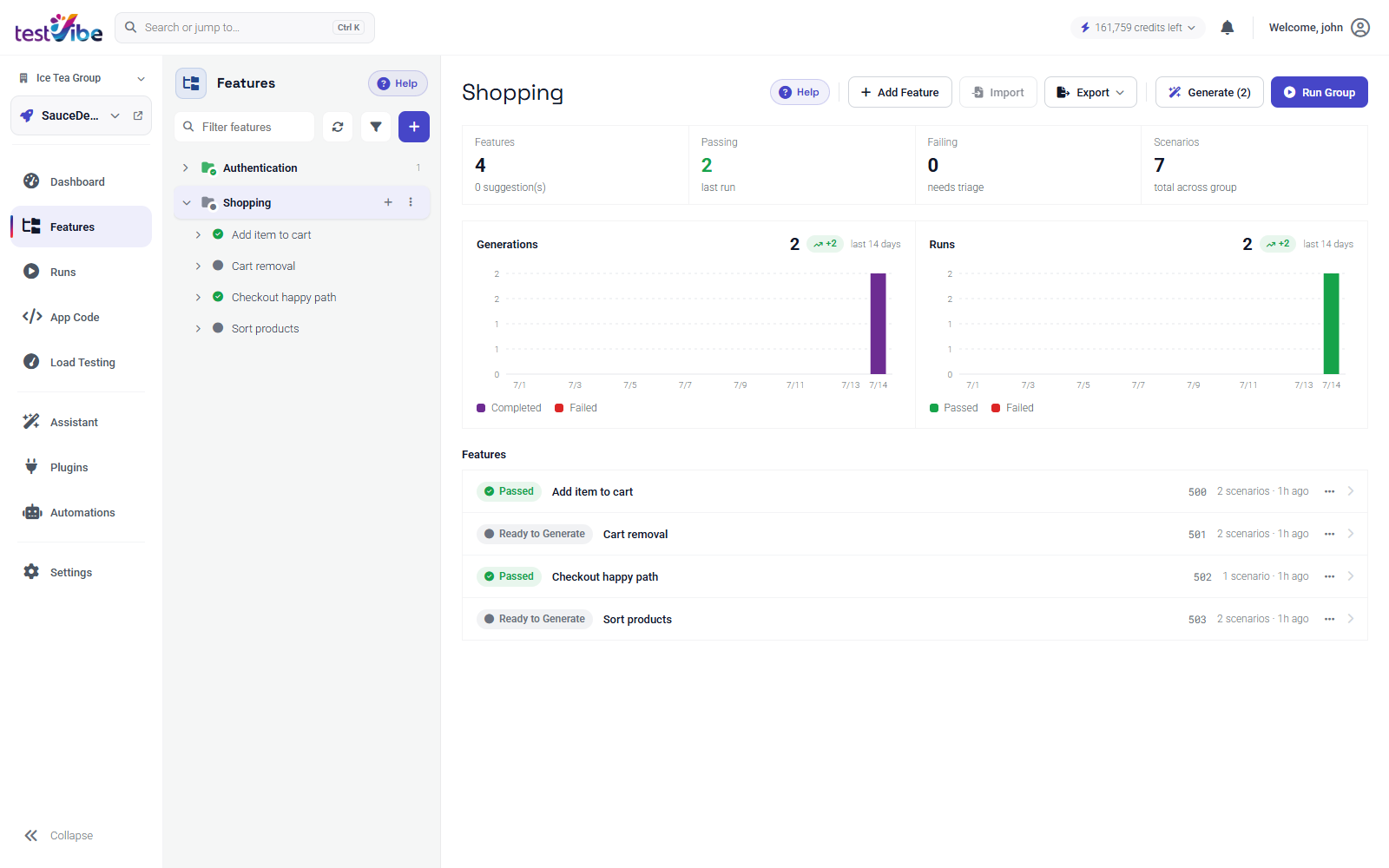
That per-group readiness view is what keeps a large suite honest. You don't scan two hundred rows; you scan a dozen groups and drill into the one whose passing count dropped.
Naming conventions that survive scale
Names are the interface to a big suite. Two rules carry most of the weight.
Describe user behavior, not test mechanics. A strong name reads like a sentence a teammate would say out loud; a weak one reads like an internal label:
| Better | Weaker |
|---|---|
User signs in with valid credentials | Login test |
Admin creates a new team member | Admin flow |
Customer downloads an invoice PDF | Invoice stuff |
Treat the name as permanent. A feature's name becomes part of its file path: creating feature Login in group Auth produces Features/Auth/Login.feature. Renaming is supported, but it moves project files, so avoid temporary labels like new-, tmp-, or a ticket number that means nothing in six months. Rename a group and every feature in it moves to the new group path, which is powerful for reorganizing and a reason to name deliberately the first time.
Keep the Feature: line specific too. Feature: Password reset and Feature: Checkout with saved payment method read well; Feature: Website and Feature: Testing are noise.
When to split a monster flow
If you've inherited a suite of long end-to-end journeys, split them when any of these is true:
- A scenario walks through several unrelated behaviors, like the classic "sign in, update profile, reset password, download invoice" chain.
- A failure early in the flow hides everything after it, so you can't tell what else is broken.
- Different parts of the flow change on different schedules and keep forcing full regeneration.
Split it into one feature per behavior, with explicit starting steps and controlled data. TestVibe has no feature-to-feature prerequisite picker; selecting a group does not establish dependency order or share a browser session. Use a short Background for setup shared by scenarios in one feature, or reviewed Playwright configuration and helpers for code-owned setup. See shared setup and dependencies and making a test runnable on its own.
For genuine variations of one behavior, the same flow across several inputs, reach for a Scenario Outline with an Examples table instead of separate features:
Scenario Outline: Search orders by status
  Given the user is on the orders page
  When the user filters orders by "<status>"
  Then only "<status>" orders should be shown

  Examples:
    | status    |
    | Open      |
    | Closed    |
    | Cancelled |
That's one feature covering three cases, not three near-duplicate files.
Keeping a suite navigable past 100 features
At scale the structure does the work. A few habits keep it that way:
- Group by product area, and keep group count small. A dozen well-named groups beat fifty thin ones. If a group grows past what fits on a screen, it's usually two areas wearing one name.
- Keep features atomic. Every feature you can name in one specific phrase is one you'll never have to open to understand.
- Filter, don't scroll. The suite's feature filter and status pills let you jump straight to what needs attention (failed generations, red runs) instead of reading the whole tree.
- Fix names early. A clear name at creation costs nothing; renaming a hundred features later costs a lot.
None of this depends on the tests being AI-generated, but it pays off more when they are: a well-named, atomic feature is also a cleaner instruction for the generator, and TestVibe verifies each generated test by actually running it. Structure the suite so a teammate can read it, and you've structured it so the generator can too.
Ready to organize your own suite? Get early access, or read the Test Suite overview to see the groups-and-features model in full.