A Gherkin feature file records the starting context, the action, and the expected result in readable form. In TestVibe, it can guide Playwright generation and review. Compare the generated assertions with that expectation before relying on a passing run.
This guide walks through where the spec sits in the workflow: how to read it, how to edit it, and why the right move when a test is wrong is almost always to change the Gherkin and regenerate rather than to patch the code.
The spec is the source of truth
Gherkin is a structured way to describe product behavior in plain language. TestVibe uses Gherkin-style feature files so test intent stays readable before it becomes generated Playwright code. That readability is the whole point: product and QA people can read and edit the expected behavior, developers can review what is being tested before looking at implementation, and the AI generator gets a clear, structured description to work from.
Concretely, the flow looks like this:
- Create or edit a Gherkin feature in the Test Suite.
- Review the feature, scenarios, and steps.
- Start generation.
- TestVibe uses the feature intent to generate Playwright code.
- Run the generated test.
- Use the results to decide whether to edit the feature, regenerate, or fix the app.
The Gherkin is the human layer. The generated .spec.js file is the machine layer; TypeScript examples in other posts illustrate Playwright concepts. When they disagree, the Gherkin is what you reason about, because it is the version a person wrote and can defend.
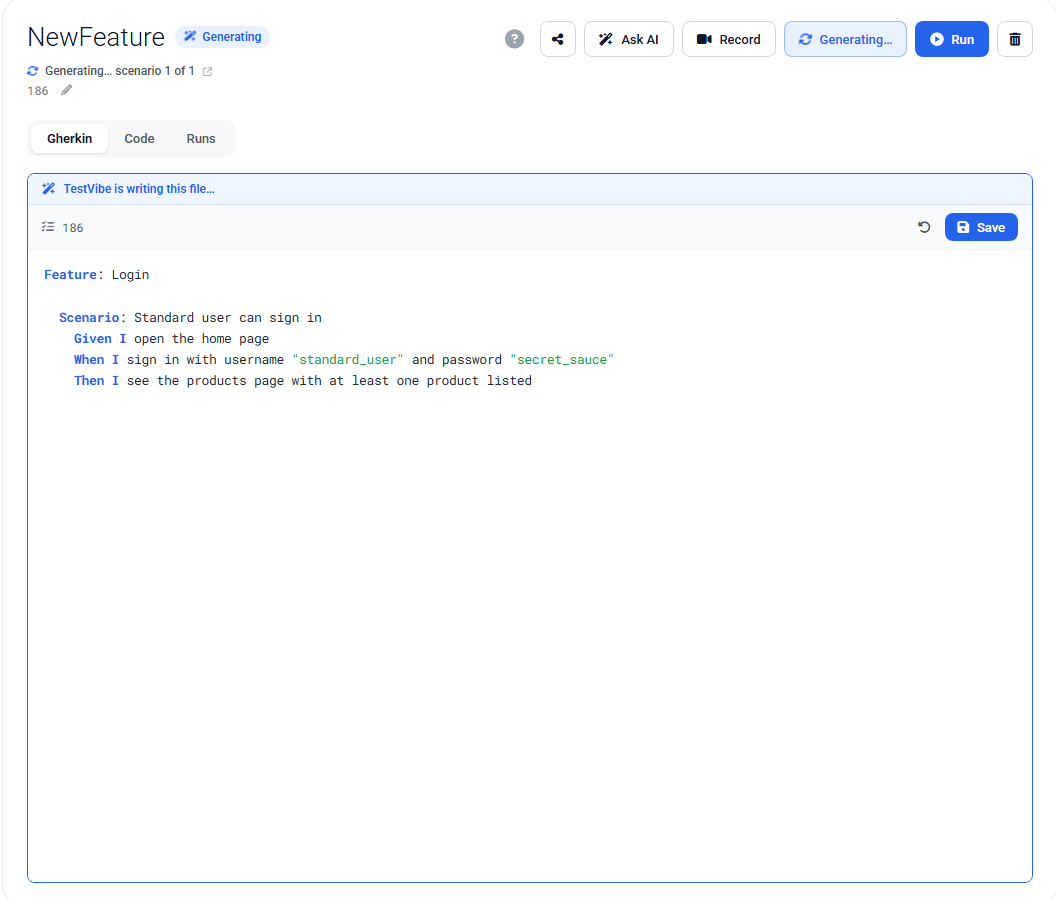
What a spec looks like
A feature file holds a Feature, optional shared setup in Background, and one or more Scenario blocks. Feature files usually live under Features/ in the project, grouped by product area.
Feature: Cart removal

  Background:
    Given I am on the "Login" page
    And I sign in with "{{var:USERNAME}}" and "{{secret:PASSWORD}}"
    And I click the "Add to cart" button on the "Sauce Labs Backpack"

  Scenario: Remove an item from the cart page
    When I click the shopping cart icon in the header
    And I click the "Remove" button next to "Sauce Labs Backpack"
    Then the cart list is empty
    And the cart badge in the top-right is not shown
Read that top to bottom and you know what the test is trying to prove without opening a single line of Playwright. Given establishes context, When performs the action under test, and Then states the outcome to verify. And continues whichever step preceded it.
The Then step carries the most weight for generation. If the expected result is vague, the generated test can end up performing actions without ever proving the behavior worked: it clicks around and passes without checking anything meaningful. A concrete Then ("the cart badge in the top-right is not shown") gives the generator a real assertion target.
Two rules that keep specs honest
Two conventions matter enough that specs go wrong without them.
Start at the entrypoint. Every feature must begin at the site's landing page (the home page, or the login page for an app behind authentication) and then navigate forward with explicit steps to wherever the scenario needs to be. Name the screen by its state (Given I am on the "Login" page), never assume an already-signed-in session or a pre-filled cart, and never hardcode a URL or localhost. TestVibe already points the test at the project's configured site, so you describe the screen, not the address.
Make created data unique. A step that creates something (a signup email, a new record name) needs a value that is fresh on every run, or the second run collides with what the first one already created. Embed the {{unique}} token inside the value:
When the user signs up with email "casey+{{unique}}@example.com"
And the user creates a project named "Project {{unique}}"
{{unique}} expands to a fresh stamp at run time, and every occurrence within one run resolves to the same value, so a later step can sign back in with what an earlier step created. Credentials use {{var:NAME}} and {{secret:NAME}} tokens instead, which resolve from your project's Variables & Secrets, so passwords never sit in the spec as plain text.
Edit the spec, not the code
Because the spec is the contract, most changes should start there. Open the feature in the Test Suite, edit the Feature, Background, Scenario, or steps, and save. Saving writes the updated .feature file to your project. An ordinary save is not evidence that generation or verification ran. Start generation explicitly when needed and inspect its outcome.
You can edit generated Playwright code directly, and sometimes that is the right call: a single locator that needs a more stable role, an extra assertion for a known delayed state, or a hook into a helper your team already owns. But keep those edits narrow. Here is the decision that keeps a suite maintainable:
| Situation | Better choice |
|---|---|
| The user journey changed | Edit Gherkin, then regenerate |
| The expected result changed | Edit Gherkin, then regenerate |
| A selector is slightly wrong | Edit the code, or add a visible label to the Gherkin |
| The generated code is broadly off | Improve the Gherkin and regenerate |
The trap is patching generated code to fix a behavior problem. The code is downstream; the next regeneration can overwrite your edit and reintroduce the bug. If the behavior is wrong, fix the description of the behavior.
Regeneration when things change
Regeneration is most effective after you improve the inputs. Re-running generation without changing anything usually reproduces the same kind of problem. So before you regenerate, decide what actually needs to change: a weak assertion means stronger Then steps, a wrong element means naming the visible label, missing setup means a Background step or a secret that was not available before.
One caveat worth stating plainly: regeneration can replace generated Playwright files. If someone hand-edited that code, those edits may be overwritten. Before regenerating, ask whether a manual change should instead move into clearer Gherkin or into a reusable helper. That is how an edit survives the next pass.
None of this removes the review step. Generation drafts the behavior and writes the code; you still decide whether the Gherkin describes the right thing, whether the code checks the right outcome, and whether a failure means the app is broken or the test is wrong. The honest version of AI-generated testing is that the tests are verified by actually running them. The spec is what tells you whether the thing that ran was the thing you meant.
Keep the Gherkin readable, keep it and the code telling the same story, and the spec stays what it is meant to be: the one artifact everyone on the team can read and trust. Get early access to try it, or read more in the Gherkin and feature files guide.