The hardest part of starting a test suite is not writing the tests. It is deciding what to cover. Staring at a working app and enumerating every flow, edge case, and empty state that deserves a test is slow, and it is the step most teams skip. TestVibe's AI exploration flips that: you give it an intent, it drives a real browser against your app, and it hands back readable feature suggestions. A suggestion alone is not evidence of a passing generated test.
This guide walks through triggering exploration, understanding what comes back, and reviewing drafts before you accept them.
What exploration actually does
Exploration lives in the TestVibe Assistant, a project-aware chat reached from the navigation rail. Open the ✨ Suggestions menu and, under Discover, choose Explore my app and suggest tests.
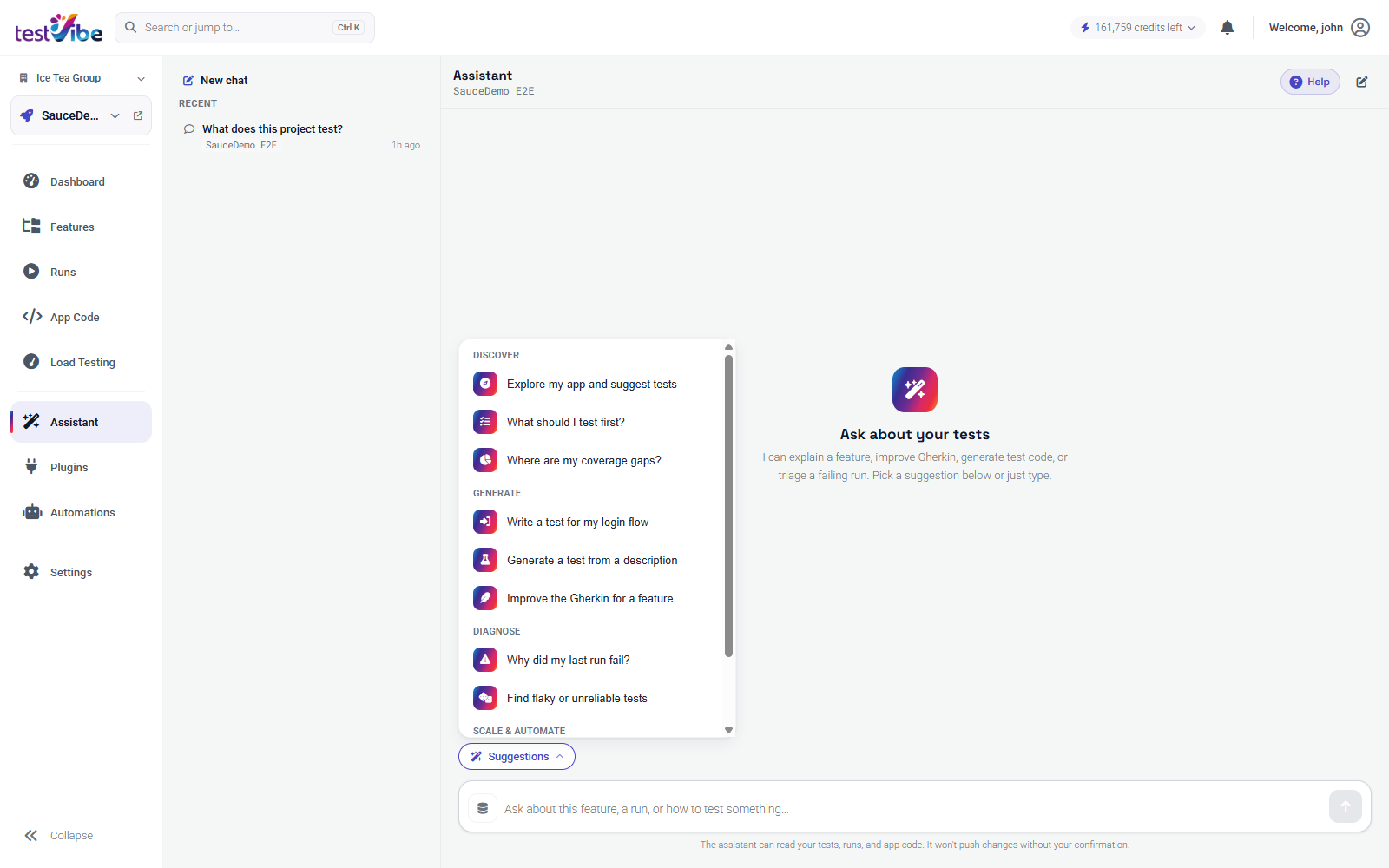
From there the Assistant drives a real cloud browser against your project's target site. It navigates, interacts with the UI, and proposes tests based on what it actually finds — not a generic checklist inferred from your project name. This is optional and never automatic. Creating a project does not probe your site; exploration only runs when you ask for it, and you can ask at any time.
Exploration can ground suggestions in observed behavior, but distinguish a live observation, a Gherkin draft, generated code and a passing run. The proposal tool can store a draft without a completed executable verification. Check the feature status and evidence before treating it as runnable.
What comes back, and when
Proposals arrive incrementally. The Assistant does not save everything up until the session ends and dump it on you — each behavior is proposed as it is proposed. You will see happy-path flows, but also the states most people forget:
- a form's validation error when a required field is empty
- an empty-search or "no results found" screen
- a state behind a filter or a specific data condition
These edge states are proposed with the same priority as the happy path. That matters, because edge cases are exactly what a hand-written first suite tends to miss, and they are where real regressions hide.
Because proposals stream in as they are verified, a session that gets cut short (it runs out of time, or you interrupt it) is not wasted. TestVibe can retain the suggestions already recorded and offers a one-click Continue exploring card so you can pick up where it left off instead of starting over.
Accepting a draft
Review and accept a suggestion you want to keep, then inspect its status. A draft can still require generation and a passing run; accepting a suggestion is not proof that executable code was already verified.
A proposed feature looks like any other TestVibe feature: a Gherkin .feature file describing the behavior, backed by the Playwright code that runs it. For example, an empty-cart checkout guard might read:
Feature: Cart checkout guard

  Scenario: Checkout is blocked with an empty cart
    Given I am on the login page
    When I sign in using the configured standard test-user credentials
    Then I see the signed-in home page
    And my cart is empty
    When I open the cart page
    Then I do not see a "Checkout" button
    And I see a message that my cart is empty
Accepting drafts one at a time, rather than in bulk, keeps you in control of what your suite asserts. Exploration is very good at finding behaviors; you are the one who knows which of them are worth guarding.
Review before you rely on it
AI generation does not remove the need to review tests. Do not assume a draft has run. Even a completed passing verification does not decide whether the behavior it captured is the behavior you want to protect. Before you lean on an accepted draft, read it against a short checklist:
| Review | Question to ask |
|---|---|
| Feature name | Does it describe the product behavior clearly? |
| Scenarios | Is each scenario focused on a single outcome? |
| Steps | Are the steps visible and repeatable on every run? |
| Assertions | Does each scenario prove something with a Then? |
| Test data | Can the data the test depends on exist every time it runs? |
Test data is the one that bites people. A test that passed once against whatever state your app happened to be in may not pass on a clean environment. If a proposal depends on a specific order existing or a specific user being present, make sure that condition is repeatable — either the test sets it up, or your environment guarantees it.
If a draft is close but not quite right, edit the Gherkin before you run it as part of a group. You own the feature file the moment you accept it.
Where exploration fits
Exploration is one way to go from a fresh project to a populated suite, but it is a starting point, not the whole job. A sensible workflow:
- Create a project pointing at a reachable environment — a staging or shared QA URL the cloud session can open.
- Run exploration to get a first wave of grounded suggestions across your app's core surfaces.
- Accept the drafts that matter, editing data and assertions where needed.
- Fill gaps by describing specific flows the explorer did not reach — deep multi-step journeys or behaviors that need particular setup.
The explorer covers breadth quickly; you add depth where your product's risk actually lives. One caveat: exploration can only verify against what the cloud session can reach, so point it at an environment that reflects real behavior, not a stubbed placeholder.
Exploration turns the blank-suite problem into a review problem, and a review problem is one you can finish. Start with an intent, let the agent do the walking, and keep the drafts that earn their place. Get early access to try it on your own app, or read the Assistant documentation for the full reference.